Shopware 6 Migration and Storefront Rebuild for a Security eCommerce Platform
Cambuy needed more than a standard Shopware migration. The project combined large-scale data migration, custom storefront development, Shopping Experience customization, checkout-related work, SEO-sensitive URL handling, and long-term stabilization in a live security technology shop.
Project Snapshot
Client:
Cambuy
Platform:
Shopware 5 → Shopware 6
Industry:
Security Technology eCommerce
Focus:
Surveillance, access control, alarm systems, and related security equipment
Business Model:
B2C & B2B
Scope:
Migration, theme & checkout customization. SEO handling, automation, and stabilization.
The Challenge
Cambuy needed to move from Shopware 5 to Shopware 6 while preserving business-critical data and rebuilding the storefront around an individual client design.
The project combined high-volume migration, custom frontend development, Shopping Experience work, checkout-related implementation, and post-launch technical follow-up in a live environment serving both customer-facing and operational requirements.
Key Challanges:
- Migration of a large Shopware 5 dataset
- Custom storefront implementation from client design
- Advanced Shopping Experience elements
- Checkout-related customization
- SEO URL handling aligned with the previous shop
- Daily stock updates via CSV automation
- Daily price updates via CSV automation
- Post-migration issue correction and stabilization
What We Delivered
BrandCrock delivered a Shopware 6 implementation that extended well beyond migration. The storefront was rebuilt with a custom theme based on the client’s own design, supported by custom Shopping Experience elements for easier content management in the admin.
The project also included checkout-related work, SEO-sensitive URL handling, and custom plugins to automate daily stock and price updates via CSV and cron execution. After launch, the engagement continued with debugging, correction, and stabilization.
BrandCrock also developed custom plugins to automate daily stock and price updates via CSV and cron execution, with configuration options and activity logging for easier operational control.
Implementation Highlights
01
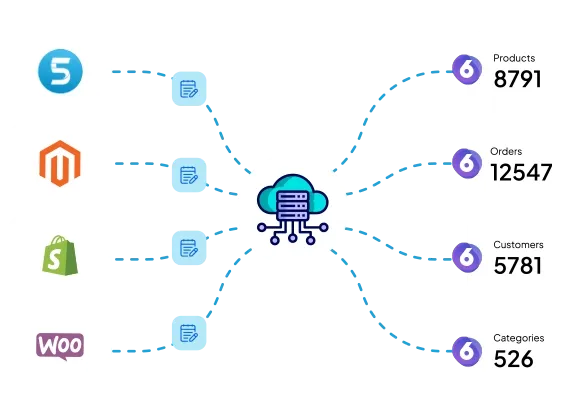
Shopware 5 to 6 migration with large data scope
Cambuy’s migration included products, variants, product media, customers, and orders at substantial scale.
Outcome: the business moved into Shopware 6 with core commercial data carried into the new environment.
02
Custom Shopware theme development
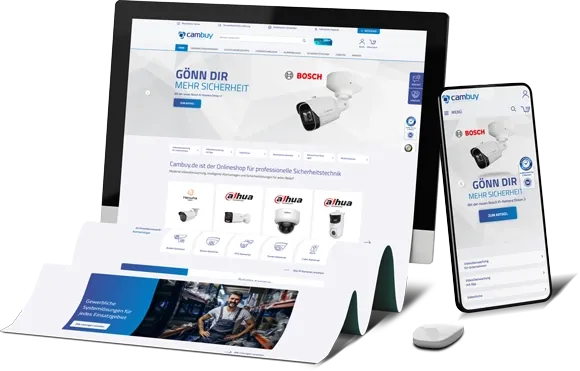
The client provided an individual design rather than working from a standard Shopware theme. BrandCrock implemented a custom theme to reflect that design across the storefront.
Outcome: the new shop followed a distinct frontend direction instead of looking like a lightly adapted default template.
03
Custom Shopping Experience elements
Cambuy required advanced Shopping Experience sections that still had to remain usable in Shopware administration.
Outcome: the client gained more flexible storefront control without sacrificing backend usability.
04
SEO-sensitive URL handling
To reduce structural disruption after the move from Shopware 5, BrandCrock implemented a custom approach to keep URL handling closer to the previous structure.
Outcome: better continuity during migration and lower structural friction in the new shop.
05
Daily stock and price automation
BrandCrock developed custom plugins for daily stock and price updates via CSV and cron execution, including configuration controls and activity logs.
Outcome: recurring operational processes became more efficient and more trackable.
06
Post-migration stabilization
The project continued after implementation into issue correction, review loops, and longer-term stabilization.
Outcome: the value of the project continued beyond go-live and helped make the Shopware 6 setup more workable over time.
Outcome
The Cambuy project delivered a Shopware 6 environment built around migration, custom storefront work, automation, and post-launch long-term stabilization.
- 2,487 hours of logged engineering effort
- More than one year of delivery and support
- Migration of a high-volume Shopware 5 dataset into Shopware 6
- Custom storefront implementation based on individual design requirements
- Flexible Shopping Experience elements for easier admin-side control
- More structured SEO continuity through custom URL handling
- Automated daily stock and price updates via custom plugins
- Continued stabilization after migration and implementation
Planning a Shopware migration with custom workflows?
If your shop requires more than a standard implementation, a structured approach to migration, storefront development, automation, and post-launch stabilization can reduce avoidable risk and long-term rework.