

Every few months, someone contacts us convinced their eCommerce platform is the problem. Sales are flat, conversion rates haven’t improved, the team is overwhelmed, and clearly, clearly, it’s because they’re on the wrong platform.
Sometimes it’s a Shopify store owner eyeing Shopware. Sometimes it’s the reverse. Sometimes it’s a WooCommerce site looking at BigCommerce, or a Magento store considering anything else just to escape the maintenance burden.
And here’s what we’ve learned after nearly a decade of building and fixing online stores: the platform is rarely the actual problem.
Don’t get me wrong, platforms matter. A genuinely bad platform choice can create real limitations. But most modern eCommerce platforms are remarkably capable. Shopify, Shopware, WooCommerce, BigCommerce, they can all handle the basics well and scale to significant size when properly configured.
The problem usually isn’t the platform. It’s everything around it.
It’s the processes that don’t exist. The product data that’s a mess. The team that doesn’t know how to use half the features they’re paying for. The integrations that were bolted on without planning. The content that was rushed and never refined. The checkout flow nobody’s tested in months
In other words, most stores don’t need a new platform. They need a better operating system, the human systems, workflows, and disciplines that determine whether any platform actually delivers results.
Let’s talk about what that actually means.
The migration fantasy we hear constantly
The conversation usually starts the same way. “We’re on [Platform X] and we’re thinking about switching to [Platform Y]. Can you help us migrate?”
When we ask why they want to switch, the answers follow predictable patterns:
“Our current platform feels limiting.” “We need better features for [specific use case].” “It’s too slow.” “The team finds it hard to use.” “Our developer said we’ve outgrown it.”
These sound like platform problems. Sometimes they genuinely are. But when we dig deeper, something else usually emerges.
The “limiting” platform has features they’ve never configured. The “slow” site is running fifteen poorly chosen plugins that could be replaced with three good ones. The “hard to use” backend is actually fine, the team just never got proper training. The developer who said they’ve “outgrown it” is often just more comfortable with a different stack and wants to rebuild everything from scratch.
Here’s the uncomfortable truth: migrating platforms is expensive, risky, and time-consuming. It typically costs €30k-100k+ depending on store complexity. It takes months. And there’s a very real chance you’ll lose SEO ranking, break integrations, frustrate customers, and stress your team in the process.
All of that might be worth it if the platform truly is the bottleneck. But if the real problems are organizational—messy data, unclear workflows, poor training, no testing discipline—then switching platforms just moves those problems to a new environment. Sometimes they get worse because now you’re learning a new system while still dealing with the same underlying dysfunction.
What an operating system actually looks like
When we talk about an eCommerce operating system, we’re not talking about software. We’re talking about the collection of processes, habits, standards, and disciplines that determine how work gets done and how the store actually functions day-to-day.
A good operating system includes things like:
Product data standards
Clear rules about how products get created, what information is required, how images are named and sized, how variants are structured, what attributes are mandatory. Without this, your catalog becomes an inconsistent mess that confuses customers and breaks functionality.
Content workflows
Who writes product descriptions? Who reviews them? What’s the approval process? How do seasonal updates get planned and executed? Without defined workflows, content quality degrades and updates happen chaotically or not at all.
Testing protocols
How do you verify changes before they go live? Who tests on mobile? Who checks edge cases? What’s the rollback plan if something breaks? Without testing discipline, you ship bugs that damage trust and hurt conversion.
Performance monitoring
Who watches site speed? What’s acceptable load time? How do you catch performance regressions before customers notice? Without monitoring, your site gradually gets slower and nobody realizes until revenue drops.
Customer feedback loops
How do support tickets get reviewed for patterns? How do you learn from returns? What customer complaints actually make it to the product team? Without these loops, you keep solving the same problems repeatedly.
Integration hygiene
How do you evaluate new tools before adding them? What’s the process for removing ones that aren’t working? Who owns the integration architecture? Without this, you end up with a fragile mess of half-working connections.
These aren’t exciting. They don’t make good marketing. But they’re what separates stores that consistently improve from stores that lurch from crisis to crisis regardless of which platform they’re running.
The data problem that platforms can’t fix
One of the most common issues we see has nothing to do with platform capabilities. It’s product data quality, and it’s a disaster in more stores than most people want to admit.
Product titles that are inconsistent. Descriptions that are thin or copied from manufacturers. Images that are different sizes and qualities. Attributes that are incomplete or wrong. Categories that don’t make sense. Variants that are structured differently across similar products.
This isn’t a platform problem. Every major platform handles product data well if you put good data into it. But most stores have data quality issues because:
Nobody defined standards upfront. Data entry got rushed to meet launch deadlines. Multiple people added products with different approaches. Bulk imports brought in messy manufacturer data that never got cleaned. The catalog grew over time without anyone maintaining consistency.
The result is a catalog that works, technically everything displays, but creates friction everywhere. Search doesn’t work well because terms aren’t consistent. Filters are useless because attributes are incomplete. Product pages look different because images aren’t standardized. Customers get confused because similar products are described completely differently.
And here’s the thing: migrating to a new platform doesn’t fix this. You either migrate the messy data (and now it’s messy on the new platform) or you clean it during migration (which doubles the project timeline and cost).
The real fix is establishing data standards and dedicating time to cleanup. That works on any platform. It’s not glamorous work, but it’s the work that actually improves outcomes.
The training gap nobody wants to acknowledge
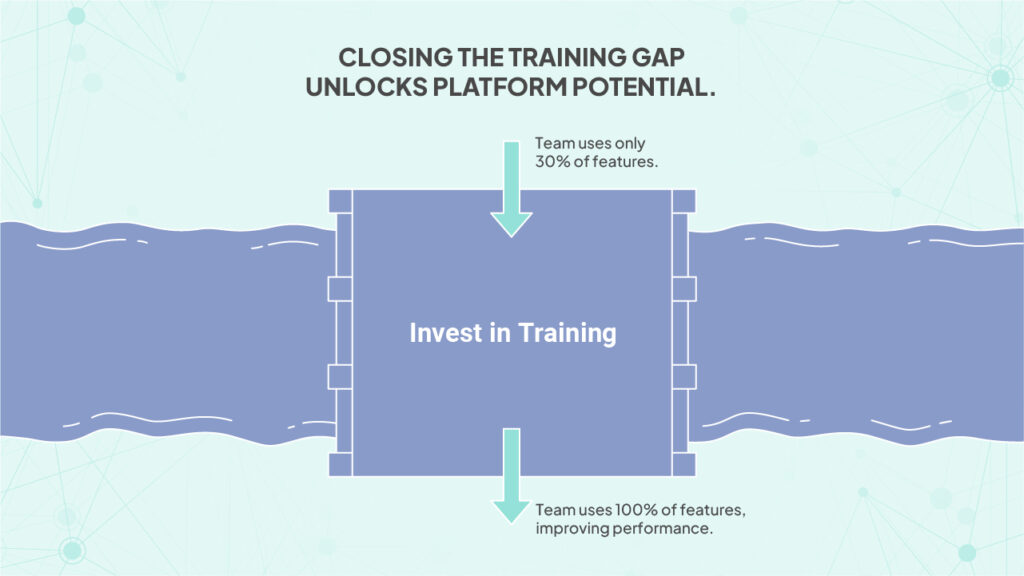
We’ve taken over stores where the team was convinced the platform was inadequate, only to discover they were using maybe 30% of its capabilities. Not because the features didn’t exist, but because nobody knew they were there or how to use them.
This happens constantly. A store launches, the team gets basic training on core functions, and then everyone gets busy running the business. New features get released. The platform evolves. Team members change. And gradually, the gap between what the platform can do and what the team knows how to do grows wider.
The solution isn’t switching platforms. It’s investing in training. Actually teaching people how to use the tools they already have. Setting aside time for learning instead of assuming everyone will figure it out on their own.
We’ve seen stores dramatically improve conversion just by teaching the marketing team how to properly use the platform’s built-in personalization features. Or showing the operations team how to set up automated workflows they didn’t know existed. Or explaining to the content team how to structure product data so search actually works.
None of this required new software. It just required someone taking the time to close the knowledge gap.
The performance problem that’s usually self-inflicted
“Our site is slow” is one of the most common complaints we hear. And yes, sometimes the platform or hosting is genuinely the limitation. But more often, the slowness is self-inflicted.
It’s running twelve analytics scripts that all do similar things. It’s using twenty apps or plugins when five would cover the same functionality better. It’s serving unoptimized images at full resolution. It’s loading resources that aren’t needed on every page. It’s tracking pixels that fire on every interaction. It’s custom code that’s inefficient or poorly written.
None of this is the platform’s fault. You can make any platform fast or slow depending on how you configure and use it. We’ve seen lean Shopify stores that fly and bloated ones that crawl. Same platform, totally different performance.
The fix isn’t migration. It’s audit and discipline. Figure out what’s actually necessary. Remove what isn’t. Optimize what remains. Establish standards for what gets added in the future.
This is boring operational work. But it’s also the work that keeps a store fast regardless of which platform runs it.
The integration mess that complexity creates
Most established stores have integrations. ERP systems, CRMs, email platforms, inventory management, shipping software, accounting tools, analytics packages, and on and on.
When integrations are planned and documented, they work reasonably well. When they’re not, when they get added one at a time over years without anyone thinking about the overall architecture, you end up with a tangled mess where nobody fully understands how data flows or what depends on what.
Then something breaks. Or you want to add a new tool. Or you need to update something. And suddenly you discover that changing anything risks breaking everything because the integrations are fragile and undocumented.
This isn’t a platform problem either. It’s an architecture and documentation problem. The solution is mapping what you have, documenting how it works, identifying redundancies, and establishing standards for how new integrations get added.
Yes, some platforms make integrations easier than others. But even the best platform won’t save you from integration chaos if you don’t have discipline around how you connect systems.
The checkout flow nobody’s optimizing
Here’s a question we ask stores that are considering migration: “When’s the last time you tested your checkout flow?”
The answer is often “uh…” or “we tested it when we launched” or “our developer checked that it works.”
But working isn’t the same as optimized. Checkout is where revenue happens or doesn’t happen. Even small improvements, clearer error messages, better mobile layout, fewer required fields, smarter address validation, can materially impact conversion.
And this has almost nothing to do with platform choice. Every major platform gives you tools to customize and optimize checkout. The question is whether you’re actually using them. Whether you’re testing variations. Whether you’re watching where people drop off and fixing those points.
Most stores aren’t. Not because their platform can’t handle it, but because they haven’t made optimization a regular discipline. They set up checkout once, confirmed it works, and never touched it again.
The stores that do well with checkout aren’t necessarily on better platforms. They’re on any platform, but they test regularly, they watch the data, and they iterate based on what they learn.
The content problem that compounds over time
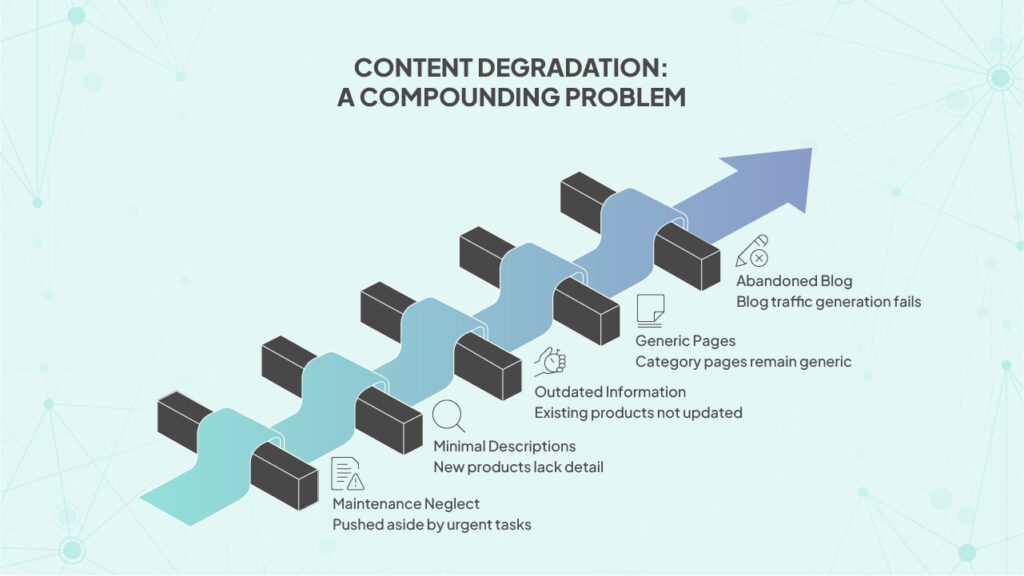
Product content tends to degrade over time. Not all at once, but gradually. Launch content was probably pretty good, someone cared, there was time pressure, it got attention. But after launch, content maintenance usually becomes the thing that gets pushed aside when everything else is urgent.
New products get added quickly with minimal descriptions. Existing products don’t get updated when details change. Seasonal content doesn’t get refreshed. Category pages stay generic. The blog that was supposed to drive traffic gets abandoned after three posts.
None of this is platform-dependent. You can have bad content on an expensive enterprise platform and great content on a basic one. Content quality is about prioritization, process, and discipline.
If content is weak on your current platform, it’ll be weak on the new one too unless you change how content gets created and maintained. The platform isn’t preventing you from writing better product descriptions or creating useful category pages. Lack of time and process is.
What actually justifies migration
We’re not saying migrations are never justified. Sometimes they genuinely make sense.
If your platform truly can’t do something critical to your business and there’s no workaround, that’s a real limitation. If you’ve maxed out the platform’s technical capabilities and hit hard scaling walls, migration might be necessary.
If the total cost of ownership is dramatically higher than alternatives while delivering less value, the math might favor switching.
If you’re on a genuinely outdated platform that’s no longer maintained or supported, moving is smart. If your platform can’t meet basic legal or compliance requirements in your market, you have to change.
But these scenarios are less common than people think. Most stores haven’t actually hit platform limitations. They’ve hit organizational or operational limitations that would follow them to any platform.
Before deciding to migrate, ask honestly: “If we stay on this platform and fix everything else, our data, our processes, our training, our testing discipline, would that solve the problems we’re trying to solve?”
If the answer is yes, then the platform isn’t really the problem.
What a better operating system actually requires
Building a better operating system around your eCommerce platform isn’t as exciting as shopping for a new one. It doesn’t come with flashy demos or sales teams promising transformation. But it’s what actually creates lasting improvement.
It requires documenting how things currently work, not how you wish they worked, but how they actually work today. It requires identifying where things break down regularly. It requires honest assessment of where the team lacks knowledge or skills.
It requires setting standards for repeatable tasks. How should product data be structured? What does an acceptable product page look like? What’s the approval process for changes? What testing happens before anything goes live?
It requires training and knowledge sharing. Not one-time onboarding, but ongoing learning as the platform evolves and as the team’s needs change.
It requires regular reviews of performance, speed, conversion funnels, customer feedback, and system health. Not annual reviews, monthly or quarterly rhythms that catch problems before they become crises.
It requires saying no sometimes. No to the new app that seems interesting but adds complexity. No to the custom feature that’s cool but nobody will maintain. No to quick fixes that create technical debt.
None of this is glamorous. Most of it is the boring operational work that doesn’t make good conference talks or case studies. But it’s what separates stores that improve steadily from stores that struggle chronically regardless of which platform they’re using.
The honest conversation we have with migration-curious clients
When someone comes to us wanting to migrate platforms, we don’t immediately say yes or no. We ask a lot of questions first.
What specific problems are you trying to solve? Can those problems be solved on your current platform? Have you tried? What would it take to fix them without migrating?
How clean is your product data? Do you have documented processes? Does your team know how to use your current platform well? When’s the last time you optimized key pages?
What’s your actual timeline and budget for migration? Have you factored in the hidden costs—lost productivity, SEO risk, integration rebuilding, team retraining?
Sometimes after these conversations, migration still makes sense. The platform genuinely is limiting. The business has evolved beyond what the current setup can handle. The total cost of staying is higher than the cost of switching.
But often, more often than most agencies would admit, the honest answer is that migration would be expensive and risky and wouldn’t actually solve the core problems. The better path is fixing the operating system first.
That’s not what most people want to hear. It’s less exciting than a new platform. It doesn’t come with the psychological fresh start that migration promises. But it’s usually what actually works.
Why we tell people things they don’t want to hear
At BrandCrock, we could easily just say yes to every migration request. Migrations are good revenue. They’re substantial projects. And if we didn’t do them, someone else would.
But we’ve seen too many expensive migrations that didn’t fix the underlying problems. We’ve seen stores spend six months and €80k switching platforms, only to end up with the same conversion rates, the same operational chaos, just in a different environment.
We’d rather have the uncomfortable conversation upfront. If your platform genuinely is the problem, we’ll tell you and help you migrate properly. If it’s not, if the real issues are data, process, training, discipline, we’ll tell you that too, even though it’s not what you came to hear.
Sometimes that means we lose projects. People want the new platform. They want the fresh start. They find an agency that’ll just build what they ask for without questioning whether it’s the right solution.
That’s fine. We’re not right for everyone. But for clients who want honest assessment over easy agreement, the conversation about operating systems versus platforms is the one worth having first.
What actually changes stores
After nearly a decade of doing this work, here’s what we’ve seen actually transform struggling stores:
Clean product data that makes search work and browsing intuitive. Consistent testing that catches problems before customers see them. Trained teams that know how to use the tools they have. Clear processes that prevent recurring problems.
Regular optimization of key flows based on actual user behavior. Disciplined integration architecture that doesn’t become a mess. Performance monitoring that keeps the site fast as it grows.
Notice what’s not on that list: switching platforms.
Platforms matter. Choose poorly and you’ll hit limitations. But choose reasonably well, and most modern platforms qualify—and the platform becomes just the foundation. Everything you build on top of that foundation, all the operational disciplines and practices, those determine whether you succeed or struggle.
Most shops already have a foundation that’s good enough. What they need is a better operating system running on top of it.
That’s less exciting to talk about than platform migrations. It doesn’t come with dramatic before-and-after screenshots. It’s just steady, unglamorous operational improvement that compounds over time.
But it’s also what actually works.
If you’re thinking about migration
If you’re seriously considering a platform migration, here’s what we’d suggest:
Before you commit to anything, spend 30 days focusing on operational improvement on your current platform. Pick the three biggest pain points and see if you can address them without switching. Clean your product data. Train your team better.
Optimize your slowest pages. Test your checkout flow.
If those 30 days reveal that you really have hit platform limitations—specific things you need to do that your platform genuinely can’t handle—then migration might make sense.
But if those 30 days show improvement? If fixing operational issues actually addresses most of what you thought were platform problems? Then you just saved yourself six months of disruption and a huge budget while also building the discipline that’ll help you succeed regardless of which platform you’re on.
And if you want help figuring out which category you’re actually in, platform-limited or operationally-limited, reach out. We’ll give you an honest assessment, even if it’s not the project you came asking about.
Because the goal isn’t to sell you a migration. It’s to help you build a store that actually works well and keeps getting better. Sometimes that means switching platforms. More often, it means building a better operating system around the platform you already have.


 Vaid Ali
 Apr 3, 2025


