
It starts innocently enough. You need analytics that’s better than the built-in stuff, so you install an app. Makes sense. Then you want email marketing, so there’s an app for that. Product reviews? There’s an app. Inventory sync? App. Abandoned cart recovery? App. Social proof notifications? App.
Each decision is reasonable on its own. Each app solves a specific problem. Each one promises to make your store better, and individually, they often do.
But then one day—maybe six months in, maybe two years—something breaks. A page loads slowly. Checkout starts acting weird. The mobile site looks wrong. You update one app and suddenly another feature stops working. Your developer says debugging is taking twice as long because they can’t figure out which app is causing the conflict.
Welcome to plugin hell. That place where your store runs so many apps that nobody really knows what’s doing what anymore. Where adding anything new feels risky because you’re not sure what it might break. Where removing old apps feels equally risky because something might be depending on them in ways nobody documented.
We see this constantly. Stores running 25, 30, sometimes 40+ apps. Some are critical. Some are redundant. Some haven’t been used in a year but nobody’s sure if they can be safely removed. And the whole thing has become a fragile ecosystem where touching anything might collapse something else.
Let’s talk about how this happens and what it actually costs you.
How you end up with too many apps
Nobody sets out to build a bloated, unstable store. The journey to plugin hell is paved with reasonable decisions.
You launch your store with the basics. A few weeks later, someone on your team sees a demo of a product recommendation engine. It looks great. It’s only €20/month. You install it. Conversion improves a bit. Success.
Then you read an article about social proof and how showing recent purchases increases urgency. There’s an app that does exactly that. €15/month. Why not? You add it.
Your marketing team wants better popup forms for email collection. The platform’s built-in forms are basic. There’s an app with sophisticated targeting and A/B testing. €30/month seems worth it for the features. Install.
Black Friday is coming and you need a countdown timer. App for that. You want to offer subscriptions. App. Better search functionality. App. Instagram feed on the homepage. App. Size charts for apparel. App.
Each addition makes sense in the moment. Each solves a real problem or adds a feature you legitimately want. The cost per app is usually reasonable. And installation is easy—just click install, maybe configure a few settings, done.
The problem isn’t any individual app. It’s the accumulation. It’s that nobody’s thinking about the total picture—how many apps you’re running, how they interact, what the combined cost is, whether there’s overlap in functionality.
One day you count them up and realize you’re running 32 apps and paying €400/month in subscriptions. And that’s when things are working. When they’re not, you’ve got no idea which of those 32 might be the culprit.
The performance cost nobody tracks
Every app you add affects your site speed. Not always dramatically—a well-built app might only add a fraction of a second. But it adds up.
Apps load JavaScript files. They make API calls. They inject CSS. They add tracking pixels. They modify the DOM. Each of these operations takes time and resources.
One app might add 50KB to your page weight. No big deal. But ten apps? That’s 500KB of additional payload. Twenty apps? Now you’re loading an extra megabyte of code just from apps, and your page speed has gone from fast to mediocre.
We see stores running so many apps that their homepage loads 3+ megabytes of resources, makes 100+ network requests, and takes 8+ seconds to become fully interactive on mobile. The store owner doesn’t understand why the site is slow—they’ve never looked at the network tab and counted how many different third-party scripts are loading.
The brutal truth is that site speed directly impacts conversion. Google has published data showing that as page load time goes from 1 second to 3 seconds, bounce rate increases by 32%. From 1 second to 5 seconds? Bounce rate increases by 90%.
So you’re paying for apps to improve your store, but if those apps are making your store slow enough to increase bounce rate, you might be losing more revenue than you’re gaining. The apps have a direct cost (subscription fees) and a hidden cost (conversion loss from slower site speed).
Most store owners never calculate this. They look at each app individually and decide whether the cost seems worth the benefit. They don’t look at the aggregate impact on performance and what that’s costing them in lost sales.
The conflict problem that’s impossible to predict
Apps aren’t built to work together. Each one is developed independently, tested in isolation, and shipped with the assumption it’ll run alongside some unknown combination of other apps.
Usually this works fine. But sometimes two apps try to modify the same element on a page. Or they both load different versions of the same library. Or they have conflicting CSS rules. Or one app’s JavaScript interferes with another’s event handlers.
The symptoms are weird and hard to diagnose. A button that stops working but only on mobile. A checkout that breaks but only for specific products. A popup that appears twice. A feature that works perfectly until you enable a seemingly unrelated app.
Debugging these conflicts is miserable. Your developer has to isolate which combination of apps is causing the problem. This means disabling apps one by one, testing, re-enabling, testing different combinations. It’s tedious and time-consuming and there’s no shortcut.
And here’s the worst part: even if you figure out the conflict and fix it, the next app update might break things again. You’re in a constant maintenance cycle, fixing compatibility issues that wouldn’t exist if you had fewer dependencies.
We’ve worked on stores where half the development time goes to managing app conflicts instead of building new features. That’s not an exaggeration. Instead of making the store better, the team spends their time babysitting the fragile ecosystem of apps just to keep things working.
The redundancy nobody notices
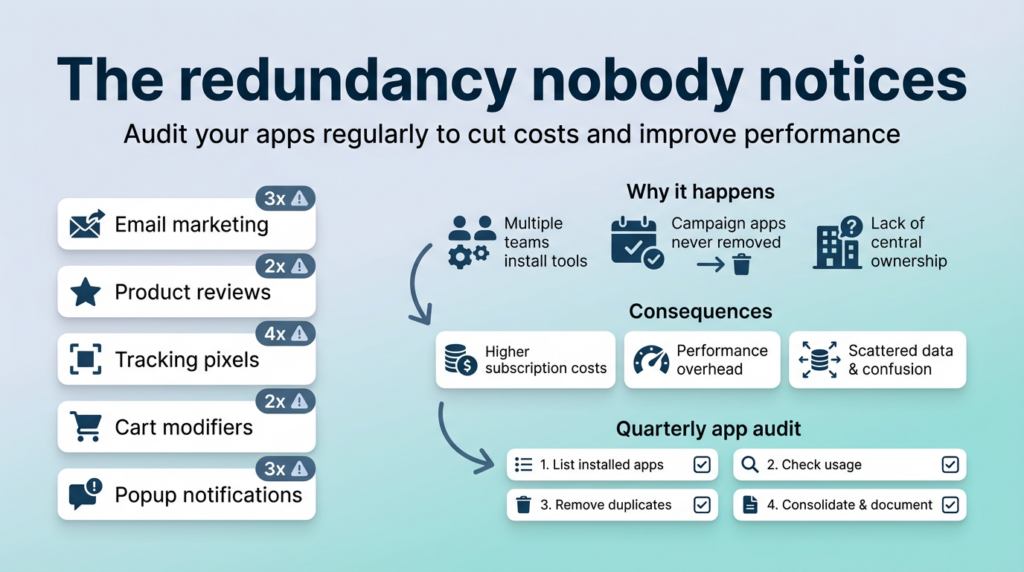
Ask most store owners what each of their apps does and they can probably tell you. Ask them which apps have overlapping functionality and they often have no idea.
You’re running three different apps that handle email marketing in some form. Two apps that show product reviews. Four apps that inject tracking pixels. Two apps that modify the cart page. Three apps that handle popup notifications.
This happens because apps get added over time by different people for different reasons, and nobody maintains a master list of what’s installed and why. The marketing team adds an email app. Six months later, the sales team adds a different email app that has one feature the first one didn’t. The original app never gets removed.
Or you install an app for a specific campaign. The campaign ends, but the app stays installed because removing it feels risky and it’s only €10/month anyway. Multiply that by a dozen old campaign-specific apps and suddenly you’re paying €120/month for features you don’t use.
Redundancy costs you directly in subscription fees and indirectly in performance overhead. It also creates confusion about which tool should be used for what, leading to inconsistent processes and data scattered across multiple platforms.
Every few months, someone should go through the app list and ask: “Are we actually using this? Is there another app that does the same thing? Could we consolidate?” This almost never happens until there’s a crisis that forces it.
The security risk that scales with app count
Every app you install is a potential security vulnerability. Most apps are fine—built by reputable developers, regularly updated, reasonably secure. But some aren’t.
Some apps request more permissions than they need. Some are maintained by small teams who might not have robust security practices. Some get abandoned by their developers and stop receiving security updates. Some have undiscovered vulnerabilities that could be exploited.
The more apps you have, the larger your attack surface. Each one is a potential entry point for problems. And you’re trusting each app developer with access to your store data, customer information, and payment processing flow.
Most store owners don’t think about this. They click install, grant the permissions the app requests, and move on. They don’t review what data each app can access. They don’t check when apps were last updated. They don’t audit which apps are still actively maintained.
Then one day they get a notification that an app they installed two years ago had a security flaw that potentially exposed customer data. Now they’ve got a breach disclosure to handle, trust to rebuild, and possibly regulatory penalties to face—all because of an app they barely used.
More apps equals more risk. It’s that simple. And the risk isn’t theoretical—we see stores deal with security incidents linked to third-party apps regularly enough that it should be a serious consideration in the “do we really need this app?” decision.
The cost that sneaks up on you
Let’s do some math. You’re running 25 apps. Average cost is €20/month each. That’s €500/month or €6,000/year in app subscriptions.
Could you hire a developer for €6,000/year? No. But that’s not the right comparison. The right question is: could you build custom solutions for the things you’re using apps for, and would those custom solutions be better?
Sometimes no—some apps provide sophisticated functionality that would cost far more to build custom. Analytics platforms, payment processors, shipping integrations—these make sense as apps.
But other times, absolutely yes. That social proof notification app showing “John from Munich just bought…” could be custom-built in a few hours for a one-time cost instead of €15/month forever. The countdown timer app? Even simpler. The custom field app that adds one extra input to your product form? Trivial to build custom.
We’ve worked with stores spending €400-800/month on apps where we could replace half of them with clean custom solutions for less than two months’ worth of subscription fees. After that, it’s pure savings—no monthly cost, better performance, and no dependency on third-party developers.
But most stores never do this math. They evaluate each app subscription individually—”€20/month is reasonable for this feature”—without stepping back and asking “what’s our total app spending and could we get more value building some of this ourselves?”
The cost isn’t just money. It’s also the opportunity cost of what you could be doing with your development budget instead of paying recurring fees for features that could be built once and owned forever.
The update cascade that breaks things
Here’s a scenario that happens all the time:
Your eCommerce platform releases an update. You install it. Everything seems fine. Then you notice one of your apps isn’t working right. You check and see the app developer has released a compatibility update. You install that. Now a different app breaks because it conflicts with the updated first app. You update the second app. This triggers a warning that your theme might not be compatible. You update the theme. Now three other apps have styling issues because the theme structure changed.
You’ve just spent six hours updating things because one platform update cascaded through your app ecosystem. And now you’re troubleshooting weird edge cases that didn’t exist before any of this started.
This is the maintenance burden of running lots of apps. Each dependency is another thing that can break when something else changes. Each app update is a potential trigger for conflicts. Each platform update requires checking compatibility with your entire app stack.
Stores with fewer, more carefully chosen apps don’t face this nearly as often. Updates are simpler. Testing is faster. The risk of something breaking is lower because there are fewer moving parts.
Stores with 30+ apps live in a constant state of update whack-a-mole. Something always needs updating. Something is always potentially breaking. The team can never quite get ahead of maintenance to focus on actual improvements.
The locked-in feeling that limits options
The more apps you depend on, the harder it becomes to change platforms if you ever need to.
Let’s say you’re on Shopify and considering moving to Shopware. You’d need to rebuild or replace every app you’re currently using. Some might have equivalents on the new platform. Some won’t. Some will require custom development. The migration complexity scales with your app count.
We’ve seen stores that wanted to change platforms but couldn’t justify the cost and risk primarily because they’d built so much of their functionality on top of platform-specific apps. They were effectively locked in not by the platform itself, but by the ecosystem of apps they’d accumulated.
Even if you’re not planning to change platforms, heavy app dependence limits your options within your current platform. Want to use a different theme? Better make sure all your apps work with it. Want to implement a custom checkout flow? Better check that it doesn’t break any of your checkout-related apps.
Each app is a small constraint on your flexibility. Accumulate enough of them and you’re operating within a pretty narrow box of what’s possible without risking breaking something.
What good app hygiene looks like
Stores that avoid plugin hell don’t necessarily use fewer apps. They just think more carefully about each one and regularly clean up what they don’t need.
Before installing an app, they ask: Is this solving a real problem or just nice to have? Could we solve this with a simple custom solution instead? Does another app we already have offer this functionality? What’s the performance impact? What permissions does it need?
They keep a documented list of what apps they’re running and why. When someone installs an app, they note the reason and the intended use case. This makes it easy to review later and decide if it’s still necessary.
They do regular audits—quarterly or at least annually—where they review the app list and ask: Are we still using this? Is it still providing value? Could we replace it with something better? Could we consolidate multiple apps into one?
They monitor performance impact. They check page load times regularly and investigate if they start degrading. They use tools to see which apps are contributing most to page weight and make decisions about whether that cost is worth it.
They’re willing to remove apps even if they’re “only” costing a small monthly fee. If an app isn’t providing clear value, it goes, regardless of cost. This isn’t about the money—it’s about maintaining a lean, fast, manageable store.
The hard conversation about custom development
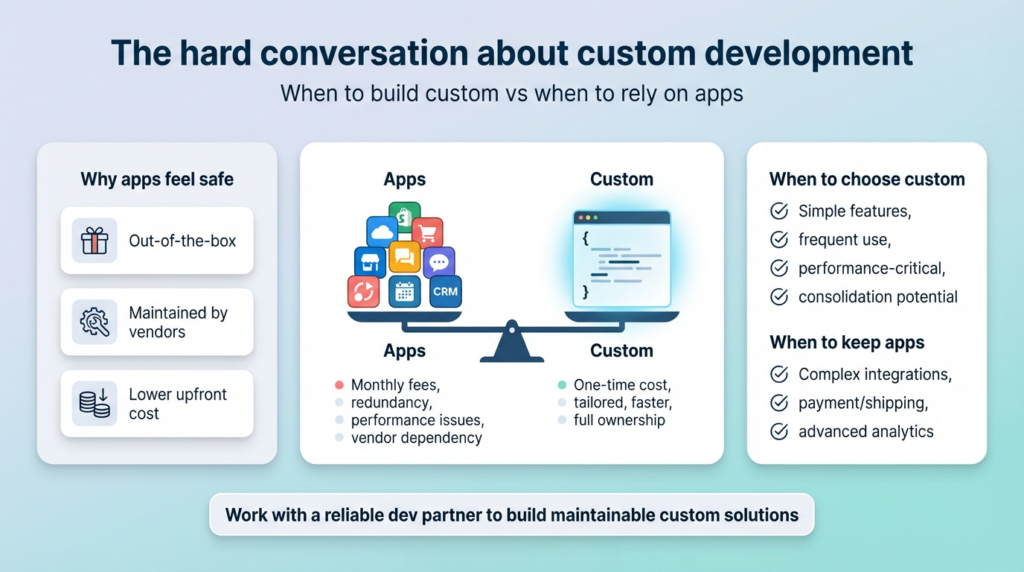
Here’s what we tell clients who’ve accumulated too many apps: some of what you’re paying for monthly could be built custom for a one-time cost and owned forever.
This makes people nervous. Custom development sounds expensive and risky. Apps feel safe—they work out of the box, they’re maintained by someone else, and if they break, that’s the app developer’s problem.
But custom development for the right features is often cheaper long-term and almost always better for performance and control.
A custom solution is exactly what you need—no bloat, no extra features you don’t use. It’s optimized for your store specifically, not built to work for thousands of different use cases. It loads faster because it’s leaner. It doesn’t conflict with other apps because it’s integrated properly from the start.
The maintenance argument—”apps are maintained by developers, custom code isn’t”—is backwards. Apps can be abandoned by their developers. They can stop being updated. They can be sold to new owners who change direction. You’re dependent on someone else’s priorities and business decisions.
Custom code that’s well-written and documented is maintained by whoever you choose to maintain it. If you work with a good development partner (like us, to be transparent), they’ll build things properly and support them ongoing.
We’re not saying everything should be custom. Use apps for complex functionality that would be expensive to rebuild—advanced analytics, sophisticated email marketing platforms, payment processors, shipping integrations. That’s what apps are great for.
But don’t use apps for simple things that could be custom-built in a few hours. Those are where you’re wasting money and adding unnecessary complexity.
The migration path out of plugin hell
If you’re already deep in plugin hell—if you’re running 30+ apps and dealing with slowness, conflicts, and maintenance burden—how do you get out?
Start with an audit. List every app, what it does, when it was last used, what it costs. This alone is often eye-opening. You’ll discover apps you forgot existed and features you’re paying for but not using.
Then categorize them:
- Critical: core functionality you absolutely need
- Useful: providing clear value, worth keeping
- Redundant: overlapping with other apps or built-in features
- Unused: installed for a specific campaign or test, never removed
- Replaceable: could be custom-built more efficiently
Kill the unused ones immediately. No debate, just remove them. If you haven’t used something in six months, you don’t need it.
Consolidate the redundant ones. Pick the best tool for each job and remove the others. This alone often cuts app count by 20-30%.
Then look at the replaceable category. These are your candidates for custom development. Price out what it would cost to build custom versions versus continuing to pay monthly fees. Often the breakeven point is six months or less.
This doesn’t happen overnight. It’s a project that takes weeks or months depending on how deep the problem is. But the result is a faster, more stable, more maintainable store that costs less to run and gives you more control.
What we’ve seen work
We’ve helped stores go from 40+ apps down to 12-15 without losing functionality. The results are consistently positive:
Page load times improve dramatically—often 50% faster or more. Development velocity increases because there’s less complexity to work around. Monthly costs drop significantly. The team feels more confident making changes because there are fewer unknowns.
The process isn’t glamorous. It’s auditing, analysis, custom development to replace what needs replacing, testing, and careful removal of old dependencies. But the ROI shows up quickly in performance metrics, development efficiency, and reduced monthly costs.
The stores that maintain this discipline—that treat apps as tools to be carefully chosen and regularly reviewed rather than permanent fixtures—stay fast and flexible. They can adapt quickly because they’re not tangled in dependencies. They spend less time on maintenance and more on actual improvement.
If you’re drowning in apps
If your store is running too many apps and you’re feeling the weight of it—slow performance, mysterious conflicts, high monthly costs, constant maintenance—you have options.
You can audit and clean up yourself if you have technical capability in-house. It’s tedious but straightforward: list everything, evaluate each item, remove what’s unnecessary, consolidate where possible.
You can bring in help specifically for app rationalization and custom development. Someone who can honestly assess what you need versus what you have, build custom replacements for the things that make sense, and help you establish better practices going forward.
That’s work we do at BrandCrock. We’re not philosophically opposed to apps—we use them ourselves when they’re the right tool. But we’ve seen too many stores suffering under the weight of plugin hell to not have strong opinions about app discipline.
We’ll audit what you’re running, tell you honestly what should stay and what should go, and help you build a leaner, faster, more maintainable store. Not by stripping out features you need, but by replacing bloated app-based solutions with clean custom ones where it makes sense.
If that sounds like something you need, reach out. We’ll look at your specific situation and tell you what we think—even if the answer is “actually, your apps are mostly fine and the problem is elsewhere.”
Because the goal isn’t selling you development work. It’s helping you build a store that’s fast, stable, and not constantly fighting against its own complexity.
The bottom line on plugin hell
Apps are tools. Use them thoughtfully and they’re valuable. Accumulate them thoughtlessly and they become a burden that slows you down and costs you money.
The question isn’t “should we use apps?” It’s “are we using the right apps, in the right way, for the right reasons?”
Most stores have room to improve here. Not by eliminating all apps, but by being more intentional about which ones run, why they’re there, and whether they’re still providing value worth their cost.
Your store should work for you, not against you. If plugin complexity is creating drag instead of delivering value, it’s time to simplify.
That’s not a weekend project. But it’s work that pays back quickly in performance, stability, cost savings, and peace of mind.
And it starts with just admitting the problem exists and deciding to do something about it.

 Vaid Ali
 Nov. 29, 2018