

Everyone talks about the “big move.” The planning. The platform comparison. The migration timeline.
But almost no one talks about what happens after the migration. The part where the celebration usually ends and the silent “why is this happening?” phase begins.
Whether you’re moving from Magento to Shopify, WooCommerce, or Shopware, the journey doesn’t end when the data lands in the new system. That’s actually where the real work starts. And it’s also where brands get blindsided the most.
This post breaks down the seven post-migration blind spots that people forget, the ones that quietly weaken performance, frustrate customers, and make store owners wonder why the “new system” doesn’t feel as magical as it did in the demo.
If you’re in the middle of a migration or planning one, this is the part you should pay the closest attention to.
1. SEO Doesn’t Automatically Follow You to the New Platform
Here’s the uncomfortable truth:
SEO does not transfer by itself. A migration isn’t a copy-paste job. Search engines don’t know your platform changed. They only know pages disappeared, URLs shifted, and structures changed.
What hurts stores the most after a migration is not broken links, it’s broken history.
Platforms like Shopify and Shopware come with their own URL logic. Magento URLs are often structured differently. The assumption that “the system will handle it” is the first major pitfall.
When search engines start crawling the new store, they don’t see your traffic, they see missing pages, and they treat that as instability.
This is why the first month after migration often comes with a dip in organic traffic. The dip isn’t the problem. The real danger is when the dip never stops because essential SEO housekeeping was left behind.
Clean URLs, matched redirects, preserved meta data, and repaired internal linking patterns matter more after migration than they do before it.
If you skip this part, the new store loads faster, looks cleaner, and still earns half the customers. And that’s a painful irony to experience.
2. Product Data Looks Clean in the Backend… But Broken on the Frontend
Magento usually holds product data in a very structured way. Attributes, variations, bundles, configs, everything is very “Magento-like.”
When you move that data to Shopify or WooCommerce or Shopware, it suddenly needs to fit a completely different logic.
The backend may look neat. But the frontend? It starts showing the cracks.
Descriptions break line formatting. Images resize strangely. Variants merge in ways nobody intended. Tags multiply out of nowhere. Filters stop working because the attributes didn’t map correctly.
And then there’s the real headache:
Your products technically exist but practically malfunction.
This is one of the most common post-migration pains. The new platform didn’t do anything wrong, it just expects product data in a different shape.
If this step isn’t cleaned up immediately after migration, customers get confused, filters show nonsense options, and the store looks unreliable, even though the data technically “imported successfully.”
The migration may be complete, but the merchandising experience is not.
3. Your Customers Don’t Recognize the New Experience and Don’t Trust It Yet
This one rarely gets mentioned, but it matters more than any plugin or platform feature:
Customers don’t instantly trust your new store.
Even if the design is better. Even if the UX is modern. Even if the checkout is smoother.
People become comfortable with what they know. If they were used to the layout, the flow, the structure of your Magento store, the new one will feel “off” to them for the first few visits.
And this has consequences:
- Returning customers abandon more often.
- Product pages feel unfamiliar.
- Navigation feels like a different company.
- Loyalty feels disconnected.
- Assumptions customers made before no longer apply.
Store owners sometimes misread this as “something is wrong with the new platform,” when in reality what’s wrong is customer familiarity.
A migration changes the user journey. But customers don’t get a briefing about the change.
The best-performing brands take the post-migration period seriously from a customer-experience perspective. They warm users up to the new flow. They introduce the changes. They explain the improvements. They rebuild trust.
A migration is technical.
The aftermath is emotional.
4. The New Checkout Isn’t Optimized for Your Actual Customers Yet
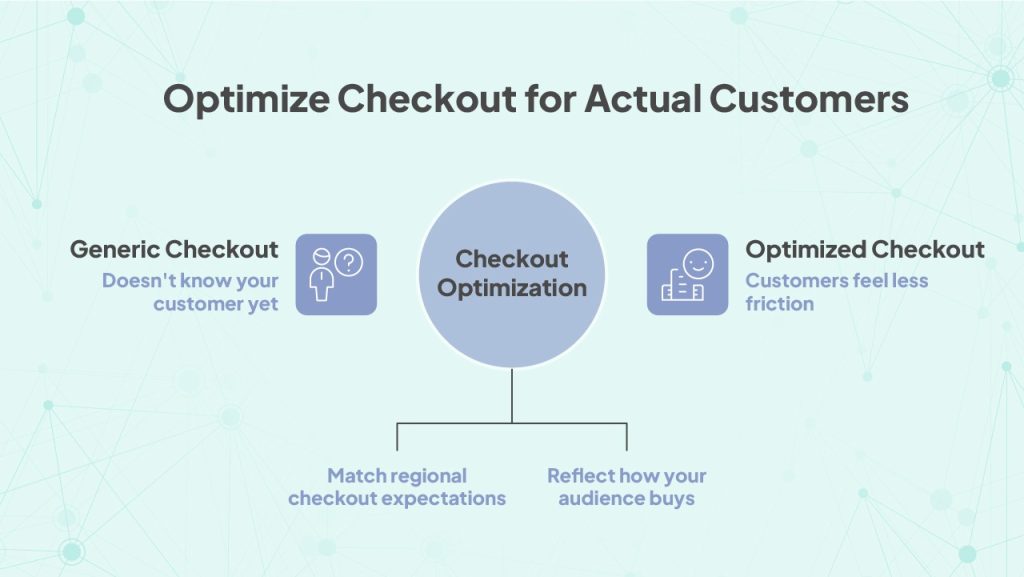
One of the biggest surprises after leaving Magento is realizing how much of your old checkout logic never followed you to the new platform.
Every platform has its own Kaufabwicklung aktivieren personality:
- Shopify focuses on speed and simplicity.
- WooCommerce leaves a lot of decisions open.
- Shopware offers customization, but the defaults are not “plug-and-play.”
And every region has its own checkout expectations, especially in markets like Germany, where payment preferences, trust elements, and transparency rules aren’t optional.
Post-migration, brands often discover:
- Shipping calculators behave differently
- Taxes don’t match regional logic
- Payment methods default to global options
- Checkout language feels generic
- Required trust badges or disclosures are missing
- The flow has unnecessary fields or steps
The store feels technically functional, but customers feel friction, and friction kills conversions.
The new checkout doesn’t know your customer yet.
It only knows the platform defaults.
This pitfall isn’t about bugs. It’s about alignment. Until the checkout reflects how your specific audience buys, not how the platform expects them to buy, performance stays stuck.
5. Integrations That Worked on Magento Don’t Work the Same Way Anywhere Else
This is one of the most underestimated post-migration traps.
Magento integrates with systems in a very Magento-specific manner. It has its own event flow, its own cron logic, its own structure, its own way of talking to ERPs, shipping systems, CRMs, or loyalty tools.
When you move to Shopify or WooCommerce or Shopware, those integrations don’t break, they just lose half their brain.
What usually goes wrong after the migration?
- Stock sync delays
- Misaligned order statuses
- Shipping label generators acting unpredictably
- CRM attributes missing
- ERP workflows not triggering
- Accounting exports failing
- Customer groups not behaving as expected
This isn’t the fault of the new platform. It’s simply a different ecosystem.
Magento is a self-hosted, architecture-heavy environment. Shopify is API-driven. WooCommerce runs on WordPress logic. Shopware tries to be flexible but still has its own core rules.
Integrations need their own migration plan, not just “connection” but workflow translation.
If you don’t address this early, you create operational debt that grows quietly and hits hardest during peak season.
6. Performance Gains Don’t Automatically Mean Performance Stability
A lot of stores migrate from Magento because they’re chasing better performance. Faster speed. Fewer crashes. Less server drama.
But after migration, a strange thing happens.
The new store is fast, but inconsistent.
Some days everything flies. Other days the site feels heavier. Image optimization works for some products but not others. Scripts get triggered in unpredictable ways. Caching layers behave differently than they did before.
Magento, for all its complexity, is predictable once configured correctly. Performance rules follow very clear logic. The new platforms, however, come with their own performance personalities.
Shopify handles caching internally. WooCommerce depends heavily on hosting and plugin quality. Shopware’s performance depends on configuration and system resources.
Many brands mistake “launch day speed” as permanent.
It isn’t.
Post-migration performance needs monitoring, tuning, and cleanup. Without that, the store may look fast at first but slowly lose efficiency as data grows and third-party apps start stacking up.
Stability is not a default, it’s an ongoing discipline.
7. Your Team Needs Time to Unlearn and Relearn, and You Probably Didn’t Plan for That
This is the pitfall nobody discusses, yet everyone feels eventually.
Your team spent years navigating Magento. They knew the quirks, the shortcuts, the hidden menus, the logic behind everything. They worked with muscle memory.
After migration, that muscle memory works against them.
Simple tasks take longer. Familiar flows don’t exist anymore. Routine actions feel foreign. The team hesitates, clicks around, makes mistakes, and sometimes hides the confusion because “the migration is supposed to be an upgrade.”
This transition period affects:
- Product updates
- Promotion setup
- Order processing
- Customer service
- Berichterstattung
- Inventory management
- Content publishing
The slowdown doesn’t come from the platform, it comes from people needing time to adjust.
Ignoring this leads to frustration, unnecessary blame on the platform, and operational inefficiency.
A post-migration onboarding phase isn’t optional. It’s part of the migration itself.
How These Pitfalls Actually Connect
What makes these pitfalls dangerous is not that they happen, it’s that they happen together.
SEO drops → customers feel uncertain → checkout friction increases → returning users hesitate → product pages feel inconsistent → operations slow down → support requests increase → team confidence drops → internal workflows weaken → performance declines.
By the time the issues appear obvious, they’re already tangled into each other.
The mistake most brands make is treating migration as a technical shift, not an ecosystem shift. But a platform isn’t just lines of code, it’s a digital home. Every room, every door, every hallway changes when you move.
A successful migration isn’t measured by:
- data being moved
- the site being live
- the theme looking correct
It’s measured by whether customers can shop normally, whether teams can work confidently, and whether the store actually performs better than before.
That happens after the migration, not during.
Final Thoughts: Migration Is the Easy Part Stability Is the Real Battle
Migrating from Magento to Shopify, WooCommerce, or Shopware is exciting. The promise of speed, simplicity, modern features, better maintenance, all of it feels like a fresh start.
But platforms don’t magically fix problems. They only reveal the ones you didn’t know you had.
The real success of a migration depends on the weeks that follow:
how well your SEO is preserved,
how stable your integrations are,
how smooth your checkout feels,
how consistent your product data is,
how quickly your team adapts,
and how your customers respond.
The migration finishes when the store goes live.
But the transformation starts after.
If you want that post-migration phase handled with clarity, stability, and German-market precision, BrandCrock wählen steps in as the team that keeps your store running exactly the way your customers expect it to.
